There are still many projects and companies utilizing Microsoft Project (MSP) to run their major projects. When utilized, one of the common requirements is showing the Plan % Complete per activity and at the Summary Level. However, Microsoft Project does not have a built-in feature for this.
As a result, many planners create static formulas — either in one column or spread across a few. These formulas are completely static and use only the information of each individual line (activity or summary level). They have no relationship with other rows or higher-level summaries.
For example, in the screenshot below, the progress of Activity 3 and Activity 4 is shown as the same 40% simply because their durations are equal.
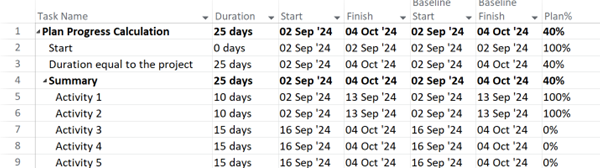
If the amount of work for both the activity and summary level was equal, then the plan progress should have been equal. In a real schedule with many activities and multiple Summary Levels, assuming that every activity and summary level with equal duration has equal work is impossible.
To calculate the plan progress based on proper weight values, a VBA code is required. The screenshot below illustrates the progress of the same schedule based on the duration as the basis of weight value.
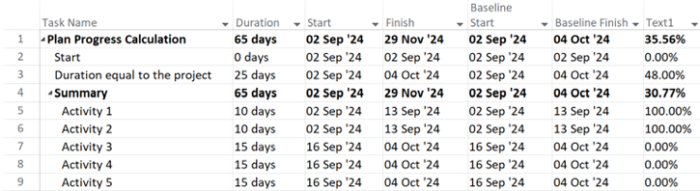
It should be noted that in the early days of a project, the issue may not be visible. However, as the project progresses and the plan progress shows very close to the actual progress despite many activities being delayed, the problem becomes evident — and the plan progress is wrong.
Discussion
No comments yet. Be the first to share an insight.
Leave a Comment